
I believe AI can make accounting and finance work much easier when used correctly. Accountants spend a lot of time working with spreadsheets, preparing reports, analysing expenses and handling repetitive tasks. This is where ChatGPT can help. Instead of using AI only to ask general questions, I would use it as a practical assistant for accounting tasks. It can help explain financial concepts, analyse data, prepare Excel formulas, summarise reports and organise financial information. However, the quality of the output depends heavily on how we communicate with AI. Let me explain how I would use ChatGPT for accountants and which techniques I find particularly useful.
1. Start With Clear Prompts
One thing I would never ignore while using ChatGPT is prompt clarity.
If I simply type “Analyse my expenses”, the response may be too general. But if I provide the accounting period, expense categories, data and expected output, ChatGPT can give a much more useful response.
For example:
Basic prompt:
“Analyse these business expenses.”
Improved prompt:
“Act as a financial analyst. Analyse the attached monthly expense data for an Indian small business. Identify the three highest expense categories, compare monthly spending and highlight unusual increases. Present the findings in a simple table.”
See the difference?
The second prompt gives ChatGPT a clear role, context, task and expected output.
I would follow this approach whenever using ChatGPT for accountants. Rather than typing short questions, I would provide enough information to get a useful response.
My simple prompt formula:
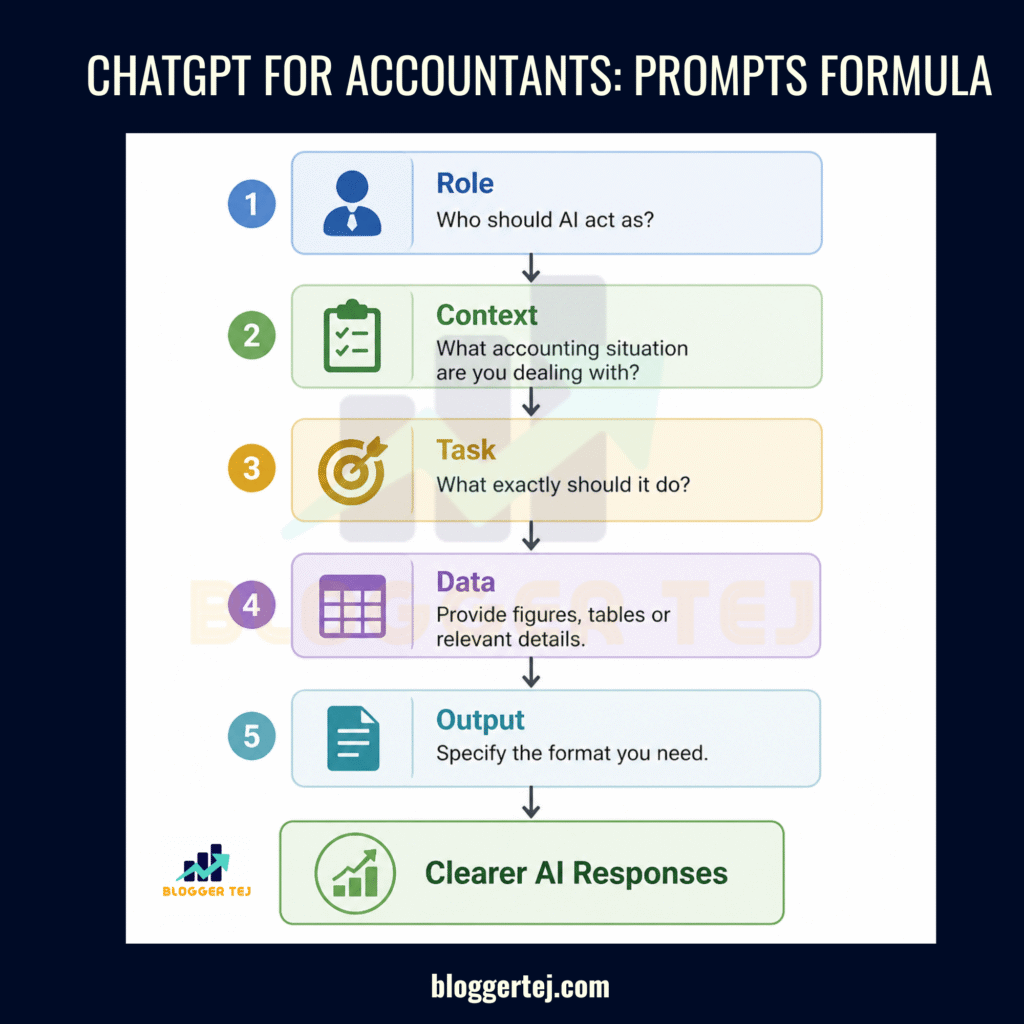
This simple formula can improve the quality of responses. I would use it as a starting point for most accounting-related tasks.
2. Useful Techniques I Would Recommend for Accountants
I see several opportunities where ChatGPT can reduce repetitive work. Here are some techniques I would actually include in an accountant’s daily workflow.
A. Use ChatGPT to Create Excel Formulas
I would use ChatGPT whenever I need help with complex Excel formulas.
For example, an accountant may need to calculate outstanding payments, identify duplicate entries or compare monthly expenses.
Instead of searching for formulas online, I can explain the requirement to ChatGPT.
Example prompt:
“Write an Excel formula to identify duplicate invoice numbers in column A. Highlight matching entries and explain how the formula works.”
It can also help with:
VLOOKUP and XLOOKUP.
SUMIF and SUMIFS.
IF and nested IF formulas.
Date and time calculations.
Conditional formatting.
Data cleaning.
For me, this is one of the easiest ways to start using ChatGPT for accountants.
B. Analyse Financial Data and Identify Trends
I would use ChatGPT to analyse financial data and understand where the money is going.
For example, suppose I have monthly sales and expense reports for the last six months.
I can upload the spreadsheet and ask ChatGPT to:
Compare monthly revenue.
Identify increasing expenses.
Calculate profit margins.
Find unusual transactions.
Highlight changes in spending patterns.
Prepare a simple financial summary.
Example prompt:
“Analyse this six-month financial report. Compare revenue, expenses and net profit. Identify unusual changes and present the results in a table. Also explain the major findings in simple English.”
This is where AI tools for accountants can save time during financial reporting and analysis.
However, I would always cross-check the calculations against the original spreadsheet before using them in official reports.
C. Simplify Bank Reconciliation
Bank reconciliation is another area where I see good opportunities for AI assistance.
Accountants often need to compare bank statements with entries in accounting software.
I would use ChatGPT to help organise the data, identify possible unmatched transactions and prepare a list of differences.
Example prompt:
“Compare these bank statement entries with the accounting ledger. Identify possible unmatched transactions, duplicate entries and amount differences. Present the results in separate categories.”
This can help narrow down the entries that need attention.
I would still verify every difference manually before finalising the reconciliation. ChatGPT should assist with the process, not independently approve accounting entries.
D. Prepare Financial Reports and Summaries
I would also use ChatGPT to convert lengthy financial information into simple reports.
For example, if I have a monthly profit and loss statement, I can ask ChatGPT to explain the major changes.
It can help prepare:
Monthly financial summaries.
Revenue and expense comparisons.
Budget vs actual reports.
Management reports.
Cash flow summaries.
Financial performance highlights.
Example prompt:
“Act as a management accountant. Review this monthly profit and loss statement. Prepare a short management summary covering revenue growth, major expenses, profit changes and areas that need attention.”
I find this particularly useful when preparing reports for business owners who may not have an accounting background.
E. Use ChatGPT to Understand GST and Tax Concepts
Indian accountants regularly deal with GST, TDS, income tax and other compliance-related work.
I would use ChatGPT to understand accounting and tax concepts in simple language.
For example, I could ask it to explain the difference between GSTR-1 and GSTR-3B, explain TDS provisions or prepare a checklist of documents required for a particular filing.
Example prompt:
“Explain the difference between GSTR-1 and GSTR-3B in simple English. Include their purpose, important details and common mistakes accountants should avoid.”
However, I would never depend entirely on AI for tax calculations or compliance decisions. Tax rules and filing requirements can change. I would verify important information through official government sources or a qualified tax professional.
F. Create Accounting Checklists and Workflows
I would also use ChatGPT to prepare standard operating procedures and checklists.
For example, an accountant handling monthly closing activities can ask ChatGPT to prepare a step-by-step checklist.
It can include:
Checking purchase and sales entries.
Verifying bank transactions.
Reviewing outstanding payments.
Checking expense classifications.
Preparing trial balances.
Reviewing financial statements.
These checklists can help organise repetitive work and reduce the chances of missing routine steps.
3. AI Tools for Accountants: Which Tasks Can They Handle?
I would not depend on a single AI platform for every accounting requirement. Different tools have different strengths.
Here are some tools I would explore.
AI Tools for Accountants:
ChatGPT – Financial data analysis, Excel formulas, report summaries and accounting explanations.
Microsoft Copilot – Spreadsheet assistance, document creation and financial data analysis.
Google Gemini – Document summarisation, data analysis and spreadsheet assistance.
Zoho Books – Invoicing, bookkeeping, expense tracking and financial reporting.
Dext – Invoice processing, receipt scanning and accounting document management.
I would consider ChatGPT and Copilot for general productivity, while accounting platforms like Zoho Books and Dext can support specific bookkeeping and document workflows.
The best combination depends on the accountant’s daily responsibilities and existing software.
4. Important Things I Would Keep in Mind
While AI tools for accountants can save time, I would not use them blindly.
There are a few things I would always keep in mind:
Verify calculations: Always cross-check financial figures and formulas.
Protect client data: Never upload confidential financial records, bank details or personal information without checking the tool’s privacy and data-handling settings.
Check tax information: Verify GST, TDS and tax-related answers using official sources.
Review reports: Check AI-generated summaries before sharing them with clients or management.
Maintain human control: Final accounting decisions and compliance responsibilities should remain with qualified professionals.
I see AI as an assistant, not a replacement for accounting knowledge.
Frequently Asked Questions (FAQs)
1. Can ChatGPT be used for accounting?
Yes. ChatGPT can help with Excel formulas, financial analysis, expense categorisation, report preparation and accounting explanations. I would use ChatGPT for accountants as a productivity assistant rather than a replacement for accounting software or professional judgement.
2. What are the best AI tools for accountants?
Some useful options include ChatGPT, Microsoft Copilot, Google Gemini, Zoho Books and Dext. I would choose based on the actual requirement. Some are better for general AI assistance, while others focus on accounting automation.
3. Can ChatGPT prepare financial statements?
ChatGPT can help organise financial data and draft financial statement summaries. It can also assist with calculations and explanations. However, I would always verify the figures and ensure the statements follow applicable accounting standards before finalising them.
4. Can accountants use ChatGPT with Excel?
Absolutely. ChatGPT can create Excel formulas, explain functions, help clean data and analyse spreadsheets. I consider this one of the most practical uses of ChatGPT for accountants.
5. Can AI tools for accountants help with GST and TDS?
Yes. AI can explain GST and TDS concepts, prepare compliance checklists and help organise relevant information. However, I would verify every important tax-related answer against the latest official rules and notifications.
6. Can ChatGPT replace accountants in the future?
I don’t think accountants should look at AI only as a threat. Many repetitive tasks can be automated, but financial interpretation, compliance decisions, client communication and professional judgement still need human expertise.
I would encourage accountants to learn how to use AI tools for accountants instead of avoiding them.
7. Is it safe to upload financial data to ChatGPT?
Accountants should be careful with sensitive information. I would avoid uploading client names, bank details, tax IDs and confidential financial records unless the organisation has approved the tool and its data protection settings. Anonymising data is a safer approach for many tasks.
8. Can ChatGPT help accountants save time?
Yes. It can reduce the time spent on repetitive tasks like preparing formulas, summarising reports, creating checklists and explaining financial information. The actual time saved depends on the task and the quality of the prompts.
CHECK : LinkedIn Personal Branding for Hyderabad Startup Founders